 BinderyLab
Personal Finances OS
Your personal expenses, tracked automatically, with 100% control over your sensitive data.
A Google Sheet that connects read-only to up to four of your banks, sorts every transaction into categories and tracks your budget against what you really spend. No subscription, and no app holding your data.
€59 one-time · lifetime updates
Why a sheet
Finance apps decide what you get to see.
01
“My bank data sits on some company's servers.”
With the sheet
The sheet, its script and its emails run in your own Google account. Nothing is stored on ours.
02
“Another subscription, for reports I can't change.”
With the sheet
You pay once and get every update. And because it is a spreadsheet, you can build any report you want.
03
“Every month I categorise the same transactions by hand.”
With the sheet
It files each transaction into categories on its own, with rules you write and AI for the rest. You fix an exception once.
See it in action
From setup wizard to your inbox.
Everything it does
What runs for you, once it's set up.
Nothing to export, upload or categorise by hand. Here is everything the sheet does.
01
Daily bank sync
Every morning it pulls the last 30 days of transactions from each of your banks, read-only.
02
Up to four banks, one place
Each bank gets its own tab, and every transaction lands in one central archive.
03
Categories that fill themselves
Your own keyword rules file each transaction first. If nothing matches and you've added an OpenAI key, AI picks from your list, and the answer is saved as a rule so it never asks twice.
04
Add your own categories
It starts with 20 ready-made categories. Add up to 32 of your own from the menu and they appear in every report.
05
Budget alerts
An email when a category reaches 50%, 80%, 90%, 100% and 115% of its monthly budget, bank by bank. Sent to you and to anyone you choose, like your partner.
06
A weekly digest
Every Monday: what you spent, by bank, top categories and merchants, your biggest transactions and budget against actual. Sent to you and anyone you choose.
07
A written AI analysis
Optionally, the digest adds a short analysis: what stands out, where to cut, repeated purchases and subscriptions that creep up. You choose the wording and tone.
08
Charts
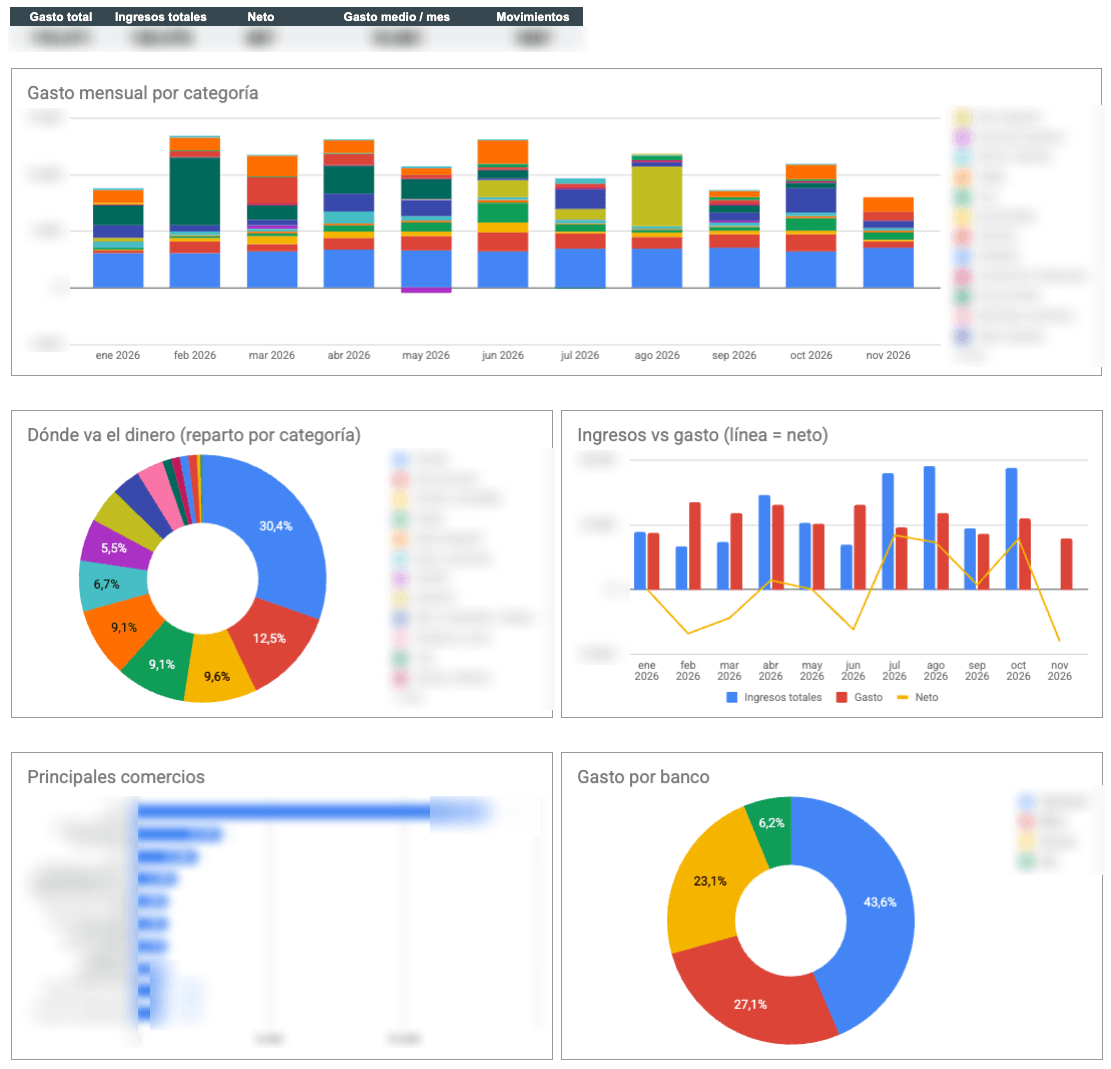
Spending by category, where the money goes, income against spending, top merchants, spending by bank and savings rate, for any date range up to 24 months.
09
Savings rate
Income, spending, monthly and accumulated savings and your savings rate, month by month.
10
Budget against reality
Set a plan for each category and bank, and see this month's plan next to what you actually spent.
11
A history that is never lost
Every transaction goes into a permanent archive. It is never rewritten, duplicates are recognised, and a category you fix by hand stays fixed.
12
Years of history
Pulls your past transactions in one go, as far back as your bank allows, up to two years.
13
Add or remove banks
Add a bank in Settings, or remove one from the menu, and the reports follow.
14
A new year in one click
Adds the next twelve months to every report, and can copy last year's budget across.
15
Leave out the noise
List the words to ignore, and it skips transfers between your own accounts, savings and broker moves so they don't distort your spending.
16
Renewal reminders
Bank access has to be renewed from time to time. Every 80 days it emails you a fresh link for each bank.
17
Health check and repair
One click checks your credentials, banks, schedules, duplicates and formulas, and repair tools fix the common problems.
18
Fully customisable
It's your own Google Sheet: change the rules, budgets, reports and even the script.
How it works
From purchase to your first sync.
01
Get your copy
You buy once and receive a link to make your own copy in Google Sheets.
02
Connect your banks
You link your banks with your own Enable Banking credentials, read-only. A step-by-step guide comes with your purchase.
03
It runs by itself
A daily sync, a Monday digest and budget alerts, all from your sheet.
What's inside
One archive, many views.
- Dashboard
- Budget vs actual
- Expenses by bank
- Archive that never loses history
- Category mapping
- Charts
- Settings
Security and ownership
Your sensitive data stays with you.
Your Google account
The sheet, its script and its emails all run as you.
Read-only bank access
It connects through Enable Banking and can read your transactions, not move money. Your bank login is never typed into the sheet.
Credentials kept privately
Your Enable Banking key and ID live in the script's private properties, not in cells.
AI is optional
If you add an OpenAI key, it sees one transaction at a time to categorise it. Leave the key empty and no AI runs.
Everything for a one-time price.
- The sheet and its script, as your own copy
- Up to four banks, each in its own tab
- Daily bank sync and automatic categorisation
- Weekly email digest and budget alerts
- Reminders to renew your bank consent
- A step-by-step setup guide, sent after purchase, in English and Spanish (the sheet is in English)
- Lifetime updates
What you'll need.
- A Google account
- Being comfortable with the sheet in English. The setup guide comes in English and Spanish
- Your own Enable Banking account, which connects the banks (they have their own terms)
- Optionally, an OpenAI key for AI categorisation and the written weekly analysis. OpenAI bills the usage, which is small for this sheet
Get it
One payment. The sheet is yours.
One payment, no subscription, lifetime updates.
FAQ
Before you decide.
What language is the sheet in?
The sheet itself is in English. The setup guide is available in English and Spanish.
Can it move money or make payments?
No. It only requests account information, read-only.
Which banks does it work with?
Those Enable Banking supports in your country, up to four at once. You can check whether yours is covered in their list of banks. See the banks Enable Banking supports
What does it cost to run?
The sheet and script are free to run in Google. Enable Banking and OpenAI have their own terms and prices, so check both before you rely on them.
Do I need an OpenAI key?
No. Without one, only your own mapping rules categorise: anything they don't match stays uncategorised, and the weekly email arrives without the written analysis.
How far back does it go?
As far back as your bank allows, up to two years, depending on the bank.
Will I get duplicate transactions?
No. The archive recognises a transaction it already has, so running a sync twice is safe.
What do I get when the year ends?
A menu option adds the next twelve months to every report, with the same structure.
What if it isn't for me?
Write to us. We'll explain our refund conditions in writing before you pay.
What is the personalised setup?
A 45-minute call where we connect your bank and set up your categories and budget together. You can add it at checkout.